Note
Go to the end to download the full example code.
Reproject grid using UTM zone information and visualize.#
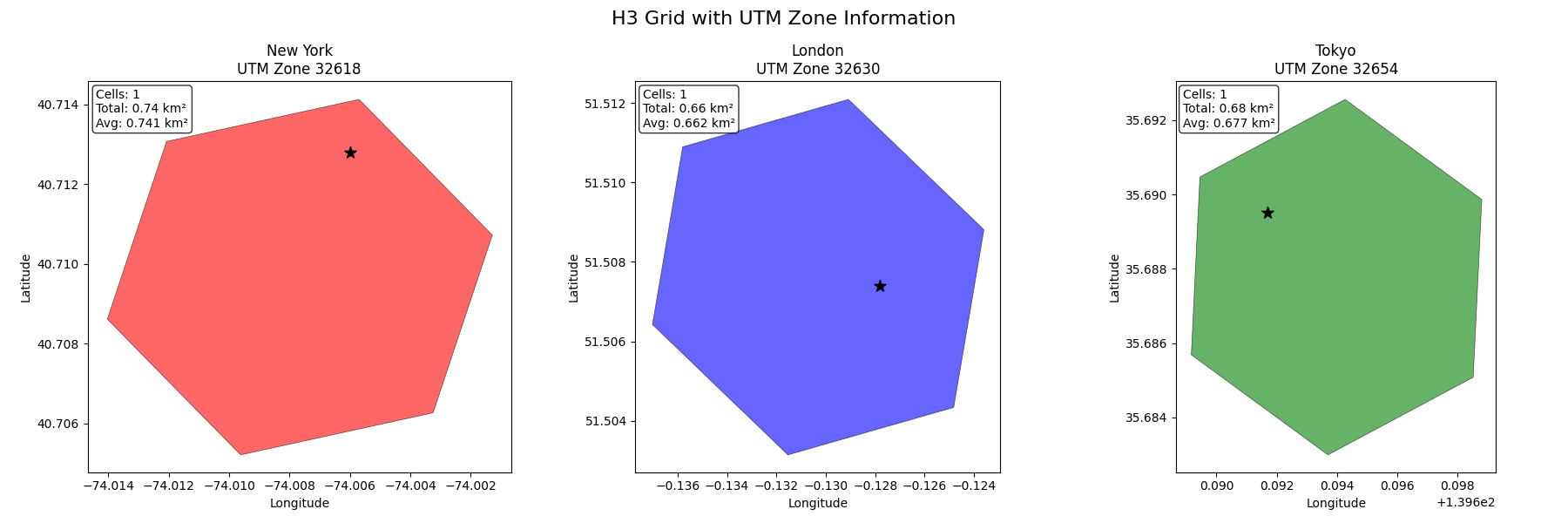
This example demonstrates how to use the UTM zone information provided by the grid systems to reproject the results and visualize area differences.
Original GeoDataFrame (WGS84):
       city country
0  New York     USA
1    London      UK
2     Tokyo   Japan
CRS: EPSG:4326

Generating H3 grid (resolution 8)...
/home/runner/work/m3s/m3s/examples/utm_reprojection_example.py:32: DeprecationWarning: The 'resolution' parameter is deprecated. Use 'precision' instead.
  h3_grid = H3Grid(resolution=8)
Generated 3 H3 cells
UTM zones found: [np.int64(32618), np.int64(32630), np.int64(32654)]

Reprojecting to UTM zones for accurate area calculation...
UTM Zone 32618: New York
  Total area: 0.74 km²
UTM Zone 32630: London
  Total area: 0.66 km²
UTM Zone 32654: Tokyo
  Total area: 0.68 km²

Area Analysis:
New York (UTM 32618):
  Cells: 1
  Total area: 0.741 km²
  Average cell area: 0.741 km²

London (UTM 32630):
  Cells: 1
  Total area: 0.662 km²
  Average cell area: 0.662 km²

Tokyo (UTM 32654):
  Cells: 1
  Total area: 0.677 km²
  Average cell area: 0.677 km²

Key insight: Each city uses its optimal UTM zone for accurate area calculations
import geopandas as gpd
import matplotlib.pyplot as plt
from shapely.geometry import Point

from m3s import H3Grid

# Create a GeoDataFrame with points across different UTM zones
gdf = gpd.GeoDataFrame(
    {"city": ["New York", "London", "Tokyo"], "country": ["USA", "UK", "Japan"]},
    geometry=[
        Point(-74.0060, 40.7128),  # NYC (UTM 18N)
        Point(-0.1278, 51.5074),  # London (UTM 30N)
        Point(139.6917, 35.6895),  # Tokyo (UTM 54N)
    ],
    crs="EPSG:4326",
)

print("Original GeoDataFrame (WGS84):")
print(gdf[["city", "country"]])
print(f"CRS: {gdf.crs}")

# Generate H3 grid cells
print("\nGenerating H3 grid (resolution 8)...")
h3_grid = H3Grid(resolution=8)
h3_result = h3_grid.intersects(gdf)

print(f"Generated {len(h3_result)} H3 cells")
print("UTM zones found:", sorted(h3_result["utm"].unique()))

# Reproject each group to its UTM zone and calculate areas
print("\nReprojecting to UTM zones for accurate area calculation...")
reprojected_results = []

for utm_zone in h3_result["utm"].unique():
    zone_cells = h3_result[h3_result["utm"] == utm_zone].copy()
    utm_crs = f"EPSG:{utm_zone}"
    zone_cells_utm = zone_cells.to_crs(utm_crs)
    zone_cells_utm["area_m2"] = zone_cells_utm.geometry.area
    zone_cells_utm["area_km2"] = zone_cells_utm["area_m2"] / 1_000_000

    cities_in_zone = zone_cells_utm["city"].unique()
    print(f"UTM Zone {utm_zone}: {', '.join(cities_in_zone)}")
    print(f"  Total area: {zone_cells_utm['area_km2'].sum():.2f} km²")

    reprojected_results.append(zone_cells_utm)

# Convert each UTM result back to WGS84 first, then combine
import pandas as pd

reprojected_wgs84 = []
for utm_result in reprojected_results:
    utm_result_wgs84 = utm_result.to_crs("EPSG:4326")
    reprojected_wgs84.append(utm_result_wgs84)

# Now combine all results (all in WGS84)
all_utm_cells_wgs84 = gpd.GeoDataFrame(pd.concat(reprojected_wgs84, ignore_index=True))

# Create visualization
fig, axes = plt.subplots(1, 3, figsize=(18, 6))
fig.suptitle("H3 Grid with UTM Zone Information", fontsize=16)

# Plot by city
cities = gdf["city"].unique()
colors = ["red", "blue", "green"]

for i, city in enumerate(cities):
    # Filter data for this city
    city_original = gdf[gdf["city"] == city]
    city_grid = all_utm_cells_wgs84[all_utm_cells_wgs84["city"] == city]
    utm_zone = city_grid["utm"].iloc[0]

    # Plot
    axes[i].set_title(f"{city}\nUTM Zone {utm_zone}")

    # Plot grid cells
    city_grid.plot(
        ax=axes[i], alpha=0.6, edgecolor="black", linewidth=0.5, color=colors[i]
    )

    # Plot original point
    city_original.plot(ax=axes[i], color="black", markersize=100, marker="*")

    axes[i].set_xlabel("Longitude")
    axes[i].set_ylabel("Latitude")

    # Add area info as text
    total_area = city_grid["area_km2"].sum()
    avg_area = city_grid["area_km2"].mean()
    cell_count = len(city_grid)

    info_text = (
        f"Cells: {cell_count}\nTotal: {total_area:.2f} km²\nAvg: {avg_area:.3f} km²"
    )
    axes[i].text(
        0.02,
        0.98,
        info_text,
        transform=axes[i].transAxes,
        verticalalignment="top",
        bbox={"boxstyle": "round", "facecolor": "white", "alpha": 0.8},
    )

plt.tight_layout()
plt.show()

# Print area comparison
print("\nArea Analysis:")
for city in cities:
    # Find the city data in the original UTM results
    city_data = None
    for utm_result in reprojected_results:
        if city in utm_result["city"].values:
            city_data = utm_result[utm_result["city"] == city]
            break
    utm_zone = city_data["utm"].iloc[0]
    total_area = city_data["area_km2"].sum()
    avg_area = city_data["area_km2"].mean()
    cell_count = len(city_data)

    print(f"{city} (UTM {utm_zone}):")
    print(f"  Cells: {cell_count}")
    print(f"  Total area: {total_area:.3f} km²")
    print(f"  Average cell area: {avg_area:.3f} km²")
    print()

print("Key insight: Each city uses its optimal UTM zone for accurate area calculations")
Total running time of the script: (0 minutes 1.102 seconds)